Home > Android > Writing an Android Sync Provider: Part 2

Writing an Android Sync Provider: Part 2

One of the great new user-facing features of Android 2.0 is the is the new Facebook app, which brings your Facebook contacts and statuses into your Android contacts database:

So, how exactly does my Nexus One know that Chris is excited about the upcoming launch of his new mobile apps? The answer is a Contacts sync provider in the Facebook app. Read on to learn how to create your own!

Sync Providers

Sync providers are services that allow an Account to synchronize data on the device on a regular basis. Not quite sure how to create an Account? Read part one first! To implement a Contacts sync provider, we’ll need a service, some xml files, and the following permissions added to the AndroidManifest.xml:

AndroidManifest.xml snippet

  1. <uses-permission android:name="android.permission.INTERNET" />
  2. <uses-permission android:name="android.permission.ACCESS_NETWORK_STATE" />
  3. <uses-permission android:name="android.permission.READ_CONTACTS" />
  4. <uses-permission android:name="android.permission.WRITE_CONTACTS" />
  5. <uses-permission android:name="android.permission.GET_ACCOUNTS" />
  6. <uses-permission android:name="android.permission.MANAGE_ACCOUNTS" />
  7. <uses-permission android:name="android.permission.AUTHENTICATE_ACCOUNTS" />
  8. <uses-permission android:name="android.permission.READ_SYNC_SETTINGS" />
  9. <uses-permission android:name="android.permission.WRITE_SYNC_SETTINGS" />

The Service

Similar to our Account Authenticator service, our Contacts Sync Provider service will return a subclass of AbstractThreadedSyncAdapter from the onBind method.

ContactsSyncAdapterService.java

  1. public class ContactsSyncAdapterService extends Service {
  2.  private static final String TAG = "ContactsSyncAdapterService";
  3.  private static SyncAdapterImpl sSyncAdapter = null;
  4.  private static ContentResolver mContentResolver = null;
  5.  
  6.  public ContactsSyncAdapterService() {
  7.   super();
  8.  }
  9.  
  10.  private static class SyncAdapterImpl extends AbstractThreadedSyncAdapter {
  11.   private Context mContext;
  12.  
  13.   public SyncAdapterImpl(Context context) {
  14.    super(context, true);
  15.    mContext = context;
  16.   }
  17.  
  18.   @Override
  19.   public void onPerformSync(Account account, Bundle extras, String authority, ContentProviderClient provider, SyncResult syncResult) {
  20.    try {
  21.     ContactsSyncAdapterService.performSync(mContext, account, extras, authority, provider, syncResult);
  22.    } catch (OperationCanceledException e) {
  23.    }
  24.   }
  25.  }
  26.  
  27.  @Override
  28.  public IBinder onBind(Intent intent) {
  29.   IBinder ret = null;
  30.   ret = getSyncAdapter().getSyncAdapterBinder();
  31.   return ret;
  32.  }
  33.  
  34.  private SyncAdapterImpl getSyncAdapter() {
  35.   if (sSyncAdapter == null)
  36.    sSyncAdapter = new SyncAdapterImpl(this);
  37.   return sSyncAdapter;
  38.  }
  39.  
  40.  private static void performSync(Context context, Account account, Bundle extras, String authority, ContentProviderClient provider, SyncResult syncResult)
  41.    throws OperationCanceledException {
  42.   mContentResolver = context.getContentResolver();
  43.   Log.i(TAG, "performSync: " + account.toString());
  44.   //This is where the magic will happen!
  45.  }
  46. }

The service is defined in AndroidManifest.xml like so:

AndroidManifest.xml snippet

  1. <service android:name=".sync.ContactsSyncAdapterService"
  2.  android:exported="true" android:process=":contacts">
  3.  <intent-filter>
  4.   <action android:name="android.content.SyncAdapter" />
  5.  </intent-filter>
  6.  <meta-data android:name="android.content.SyncAdapter"
  7.   android:resource="@xml/sync_contacts" />
  8. </service>

Finally, we need an xml file to let Android know that our sync provider handles Contacts for the Account type we defined in part 1.

sync_contacts.xml

  1. <sync-adapter xmlns:android="http://schemas.android.com/apk/res/android"
  2.     android:contentAuthority="com.android.contacts"
  3.     android:accountType="fm.last.android.account"/>

At this point we have a sync provider that doesn’t do anything, but also shouldn’t crash the Android system. Just in case, lets test it in Dev Tools first. Start the Android emulator and launch the “Dev Tools” app, then scroll down to “Sync Tester”.
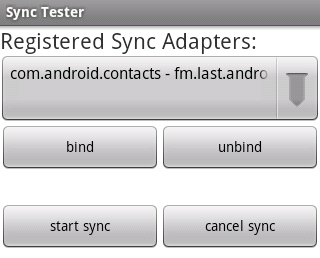
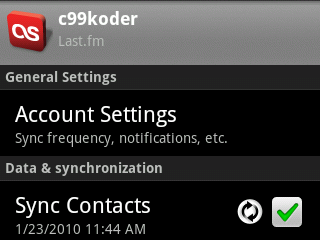
The drop-down should confirm that com.android.contacts can be synced with the account type you’ve created. Select the entry for your account type and press the “Bind” button to connect to your sync service. If all goes well, Sync Tester will say it’s connected to your service. Now click “Start Sync” and select your account from the popup. Sync Tester will let you know that the sync succeeded (even though we didn’t actually do anything). At this point it should be safe to enable contact syncing from the Accounts & Sync settings screen without Android crashing and rebooting.
Contacts

Lets take a moment to discuss how Contacts on Android work. Each sync account, such as Google or Facebook, creates its own set of RawContacts which the Android system then aggregates into the single list of contacts you see in the Dialer. The RawContacts table contains several fields that Sync Providers can use for whatever they like, and in this implementation we will use the SYNC1 field to store the RawContact’s Last.fm username.

Contact Data

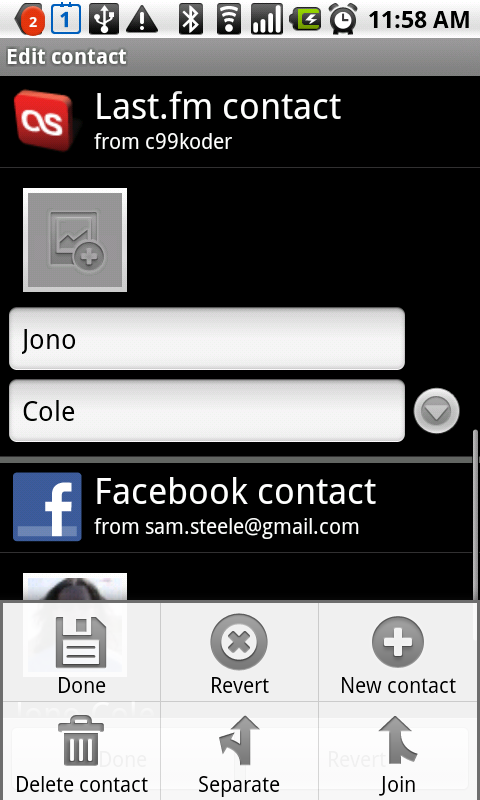
Data, such as name, phone number, email address, etc. is stored in a table that references a RawContact ID. The Data table can contain anything you like, and there are several predefined MIME-types available for phone numbers, email addresses, names, etc. Android will automatically try to combine RawContacts that contain the same name, email address, etc. into a single Contact, and the user can also combine and split Contacts manually from the contact edit screen.
Custom Data Types

A sync provider can store additional data about a RawContact in the Data table, and provide an xml file to tell the Contacts app how to format this row. To create a custom MIME type, we need to add an additional meta-data tag to our service entry in AndroidManifest.xml to reference a new ContactsSource XML file:

AndroidManifest.xml snippet

  1. <meta-data android:name="android.provider.CONTACTS_STRUCTURE"
  2.  android:resource="@xml/contacts" />

This ContactsSource xml file will tell the Contacts app how to format our custom MIME-types. In the example below, we specify an icon, and tell the Contacts app to use the DATA2 and DATA3 columns to render the fields. Note that this file’s format doesn’t appear to be documented outside of the source code for the Contacts app.

contacts.xml

  1. <ContactsSource xmlns:android="http://schemas.android.com/apk/res/android">
  2.  <ContactsDataKind
  3.   android:icon="@drawable/icon"
  4.   android:mimeType="vnd.android.cursor.item/vnd.fm.last.android.profile"
  5.   android:summaryColumn="data2"
  6.   android:detailColumn="data3"
  7.   android:detailSocialSummary="true" />
  8. </ContactsSource>

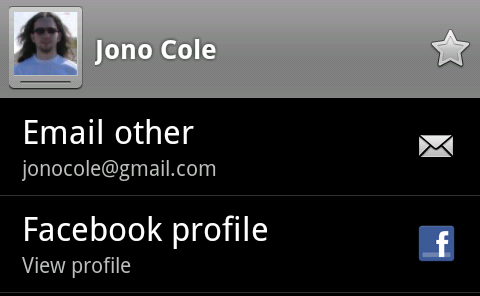
Here’s how Facebook’s custom “Facebook Profile” field looks when rendered by the Contacts app:
Creating a RawContact

Now lets put all the above information together to create a RawContact for a Last.fm user. Our contacts will display only a name and a custom field that links to the user’s Last.fm profile. We store the user’s username in the RawContact’s SYNC1 field so we can easily look it up later. We will batch together the creation of the RawContact and the insertion of the Data, as Android will run an aggregation pass after each batch completes.

addContact method

  1. private static void addContact(Account account, String name, String username) {
  2.  Log.i(TAG, "Adding contact: " + name);
  3.  ArrayList<ContentProviderOperation> operationList = new ArrayList<ContentProviderOperation>();
  4.  
  5.  //Create our RawContact
  6.  ContentProviderOperation.Builder builder = ContentProviderOperation.newInsert(RawContacts.CONTENT_URI);
  7.  builder.withValue(RawContacts.ACCOUNT_NAME, account.name);
  8.  builder.withValue(RawContacts.ACCOUNT_TYPE, account.type);
  9.  builder.withValue(RawContacts.SYNC1, username);
  10.  operationList.add(builder.build());
  11.  
  12.  //Create a Data record of common type 'StructuredName' for our RawContact
  13.  builder = ContentProviderOperation.newInsert(ContactsContract.Data.CONTENT_URI);
  14.  builder.withValueBackReference(ContactsContract.CommonDataKinds.StructuredName.RAW_CONTACT_ID, 0);
  15.  builder.withValue(ContactsContract.Data.MIMETYPE, ContactsContract.CommonDataKinds.StructuredName.CONTENT_ITEM_TYPE);
  16.  builder.withValue(ContactsContract.CommonDataKinds.StructuredName.DISPLAY_NAME, name);
  17.  operationList.add(builder.build());
  18.  
  19.  //Create a Data record of custom type "vnd.android.cursor.item/vnd.fm.last.android.profile" to display a link to the Last.fm profile
  20.  builder = ContentProviderOperation.newInsert(ContactsContract.Data.CONTENT_URI);
  21.  builder.withValueBackReference(ContactsContract.Data.RAW_CONTACT_ID, 0);
  22.  builder.withValue(ContactsContract.Data.MIMETYPE, "vnd.android.cursor.item/vnd.fm.last.android.profile");
  23.  builder.withValue(ContactsContract.Data.DATA1, username);
  24.  builder.withValue(ContactsContract.Data.DATA2, "Last.fm Profile");
  25.  builder.withValue(ContactsContract.Data.DATA3, "View profile");
  26.  operationList.add(builder.build());
  27.  
  28.  try {
  29.   mContentResolver.applyBatch(ContactsContract.AUTHORITY, operationList);
  30.  } catch (Exception e) {
  31.   Log.e(TAG, "Something went wrong during creation! " + e);
  32.   e.printStackTrace();
  33.  }
  34. }

Social status updates

Android keeps another table for social networking status updates. Inserting a record into this table will replace any previous status if the timestamp of the insert is newer than the previous timestamp, otherwise the previous record will remain and the new insert will be discarded. A status update record is associated with a Data record, in our implementation we will associate it with our Last.fm profile record. Status records contain the status text, a package name where resources are located, an icon resource, and a label resource. Below is a function that will insert a status update, as well as updating our Last.fm Profile Data record to display the last track the user listened to. Note that for efficiency purposes, we will send all the updates in a single batch, so Android will only run a single aggregation pass at the end.

updateContactStatus method

  1. private static void updateContactStatus(ArrayList<ContentProviderOperation> operationList, long rawContactId, Track track) {
  2.  Uri rawContactUri = ContentUris.withAppendedId(RawContacts.CONTENT_URI, rawContactId);
  3.  Uri entityUri = Uri.withAppendedPath(rawContactUri, Entity.CONTENT_DIRECTORY);
  4.  Cursor c = mContentResolver.query(entityUri, new String[] { RawContacts.SOURCE_ID, Entity.DATA_ID, Entity.MIMETYPE, Entity.DATA1 }, null, null, null);
  5.  try {
  6.   while (c.moveToNext()) {
  7.    if (!c.isNull(1)) {
  8.     String mimeType = c.getString(2);
  9.     String status = "";
  10.     if (track.getNowPlaying() != null && track.getNowPlaying().equals("true"))
  11.      status = "Listening to " + track.getName() + " by " + track.getArtist();
  12.     else
  13.      status = "Listened to " + track.getName() + " by " + track.getArtist();
  14.  
  15.     if (mimeType.equals("vnd.android.cursor.item/vnd.fm.last.android.profile")) {
  16.      ContentProviderOperation.Builder builder = ContentProviderOperation.newInsert(ContactsContract.StatusUpdates.CONTENT_URI);
  17.      builder.withValue(ContactsContract.StatusUpdates.DATA_ID, c.getLong(1));
  18.      builder.withValue(ContactsContract.StatusUpdates.STATUS, status);
  19.      builder.withValue(ContactsContract.StatusUpdates.STATUS_RES_PACKAGE, "fm.last.android");
  20.      builder.withValue(ContactsContract.StatusUpdates.STATUS_LABEL, R.string.app_name);
  21.      builder.withValue(ContactsContract.StatusUpdates.STATUS_ICON, R.drawable.icon);
  22.      if (track.getDate() != null) {
  23.       long date = Long.parseLong(track.getDate()) * 1000;
  24.       builder.withValue(ContactsContract.StatusUpdates.STATUS_TIMESTAMP, date);
  25.      }
  26.      operationList.add(builder.build());
  27.  
  28.      builder = ContentProviderOperation.newUpdate(ContactsContract.Data.CONTENT_URI);
  29.      builder.withSelection(BaseColumns._ID + " = '" + c.getLong(1) + "'", null);
  30.      builder.withValue(ContactsContract.Data.DATA3, status);
  31.      operationList.add(builder.build());
  32.     }
  33.    }
  34.   }
  35.  } finally {
  36.   c.close();
  37.  }
  38. }

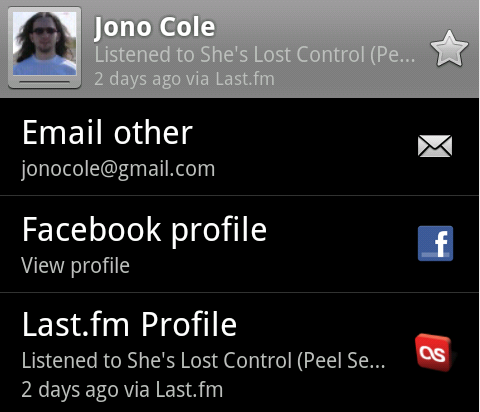
Here’s how the contact record looks after we’ve inserted a status update record and updated our data record:
Putting It All Together

Now that we have our utility functions written, we can fill in the body of our performSync method. We’re going to take a very simple approach to syncing: we’ll grab the list of RawContact IDs currently associated with Last.fm usernames, and we’ll create a RawContact for any Last.fm friend that doesn’t currently have one. If a RawContact already exists, we’ll fetch their most recent track and post a status update. Note that this is a one-way sync, we’re not dealing with local deletions or changes.

performSync method

  1. private static void performSync(Context context, Account account, Bundle extras, String authority, ContentProviderClient provider, SyncResult syncResult)
  2.   throws OperationCanceledException {
  3.  HashMap<String, Long> localContacts = new HashMap<String, Long>();
  4.  mContentResolver = context.getContentResolver();
  5.  Log.i(TAG, "performSync: " + account.toString());
  6.  
  7.  // Load the local Last.fm contacts
  8.  Uri rawContactUri = RawContacts.CONTENT_URI.buildUpon().appendQueryParameter(RawContacts.ACCOUNT_NAME, account.name).appendQueryParameter(
  9.    RawContacts.ACCOUNT_TYPE, account.type).build();
  10.  Cursor c1 = mContentResolver.query(rawContactUri, new String[] { BaseColumns._ID, RawContacts.SYNC1 }, null, null, null);
  11.  while (c1.moveToNext()) {
  12.   localContacts.put(c1.getString(1), c1.getLong(0));
  13.  }
  14.  
  15.  ArrayList<ContentProviderOperation> operationList = new ArrayList<ContentProviderOperation>();
  16.  LastFmServer server = AndroidLastFmServerFactory.getServer();
  17.  try {
  18.   Friends friends = server.getFriends(account.name, "", "50");
  19.   for (User user : friends.getFriends()) {
  20.    if (!localContacts.containsKey(user.getName())) {
  21.     if (user.getRealName().length() > 0)
  22.      addContact(account, user.getRealName(), user.getName());
  23.     else
  24.      addContact(account, user.getName(), user.getName());
  25.    } else {
  26.     Track[] tracks = server.getUserRecentTracks(user.getName(), "true", 1);
  27.     if (tracks.length > 0) {
  28.      updateContactStatus(operationList, localContacts.get(user.getName()), tracks[0]);
  29.     }
  30.    }
  31.   }
  32.   if(operationList.size() > 0)
  33.    mContentResolver.applyBatch(ContactsContract.AUTHORITY, operationList);
  34.  } catch (Exception e1) {
  35.   // TODO Auto-generated catch block
  36.   e1.printStackTrace();
  37.  }
  38. }

Contact visibility

By default, new contacts that you create from your sync provider are not shown by the Contacts app. Instead, it will show only contacts it has aggregated with other visible sources. To enable the display of contacts that only exist in your provider, press the Menu button and select “Display options”, then expand the entry for your account and tap the checkbox next to “All Contacts”. This is a good default, as I don’t really want my address book to be littered with hundreds of twitter contacts!

Final Thoughts

The Android platform is awesome. The lack of documentation, however, is quite disappointing. While it’s great that I can dig through the system source code while troubleshooting and figuring things out, I shouldn’t have to!

Sync providers require Android 2.0, which is currently only available on 2 devices. The Account modifications I made to our login activity will need to be reimplemented using class introspection in order to keep compatibility with Android 1.5.

This sync provider is far from complete — I still need to figure out how to control the sync interval, set my sync provider as read-only since local changes are ignored, I might grab the user’s avatar if they don’t currently have an icon, and add a fancy “Do you want to sync your contacts?” popup to the login process similar to Facebook’s.

Hopefully this will help other developers out there struggling with the lack of documentation, as I’m looking forward to seeing twitter status updates in the contacts app in the future!

The source code for the implementation referenced here is available in my Last.fm github project under the terms of the GNU General Public License. A standalone sample project is also available here under the terms of the Apache License 2.0. Google has also released their own sample sync provider on the Android developer portal that’s a bit more complete than mine.

Categories: Android
  1. Berto
    January 25th, 2010 at 08:05 | #1

    Excellent documentation! I’ve been pawing around through the source code for a few days and got everything set up except how to get the contact information to show up in the contact. Thanks to your post, I realized I had all the right pieces, but I wasn’t aware of how to implement them.

    To make your SyncAdapter read-only, you can use: android:supportsUploading=”false” in your sync adapter’s xml file.

  2. Sharad
    January 29th, 2010 at 09:29 | #2

    This is great documentation which unfortunately we should have got from Google. Anyways my next question is how do we add our application to QuickContact list?
    I think this should be the next step after this, what do u say?

  3. January 29th, 2010 at 11:50 | #3

    @Sharad Your application will appear in the Quick Contact list when you define an activity to view your custom MIME-type, “vnd.android.cursor.item/vnd.fm.last.android.profile” in my example above.

  4. Sharad
    February 10th, 2010 at 16:36 | #4

    Thanks for the reply…i got that after some investigation, i have one more question, when i try to add a new contact it gives a list and gives me the name of my application. I don’t want that. User should not create contacts under my application. How is this possible.

  5. February 10th, 2010 at 18:40 | #5

    @Sharad add android:supportsUploading=”false” to your contact provider xml (sync_contacts.xml in my example) to disable creation of new contacts

  6. Sharad
    February 11th, 2010 at 09:17 | #6

    Worked thanks for the help

  7. Paul
    February 20th, 2010 at 18:20 | #7

    Thanks for this great tutorial.

    I am wondering if creating a sync provider is the only way to include ones app in the Quick Contact widget. If my application has nothing to sync, but would benefit the user being in the QC list, must I create a phantom sync service (authenticate and the “whole-nine”)?

    I’m wondering if its possible to simply include my app on the QC list and, if so, how?

    Thanks in advance!

  8. February 20th, 2010 at 20:13 | #8

    The QuickContact list is built from the MIME-types associated with the contacts Data records, so as far as I know there’s no way for your app to appear in the QC list without having added a record to the data table using a sync provider. I suppose it may be possible to insert records into that table inside your app, but it still needs to be associated with your own account type.

  9. Berto
    February 24th, 2010 at 09:17 | #9

    Hey Sam,

    I’m a little curious why you explicitly perform:

    #
    builder = ContentProviderOperation.newUpdate(ContactsContract.Data.CONTENT_URI);
    #
    builder.withSelection(BaseColumns._ID + ” = ‘” + c.getLong(1) + “‘”, null);
    #
    builder.withValue(ContactsContract.Data.DATA3, status);
    #
    operationList.add(builder.build());

    in your updateContactStatus method. When I was playing around with statuses, it automatically did that for me because of the association with the data row.

  10. February 24th, 2010 at 09:27 | #10

    It’s probably unnecessary then, I hadn’t tried it without that.

  11. Brian
    March 1st, 2010 at 16:23 | #11

    Hi. Thanks again for a great writeup.

    Two questions:
    1) Any idea how to set presence indicator? I’ve tried http://developer.android.com/reference/android/provider/ContactsContract.StatusColumns.html#PRESENCE, but no luck.

    2) Any idea how to change the menu for the “Long Tap” menu? I can get the quick contact to work, I was hoping the long tap menu would inherit.

  12. Sharad
    March 2nd, 2010 at 16:55 | #12

    How do we enable the Sync by default. When i goto Accounts & Sync and in Manage Accounts i see that for my Application by default the the Sync service is off “Sync is OFF” i want this to be on by default.

  13. March 2nd, 2010 at 17:03 | #13

    @Sharad You can enable syncing with ContentResolver.setSyncAutomatically(), an example is below:

    AccountManager am = AccountManager.get(this);
    Account[] accounts = am.getAccountsByType(getString(R.string.ACCOUNT_TYPE));
    ContentResolver.setIsSyncable(accounts[0], ContactsContract.AUTHORITY, 1);
    ContentResolver.setSyncAutomatically(accounts[0], ContactsContract.AUTHORITY, true);

  14. Sharad
    March 3rd, 2010 at 14:19 | #14

    You are awesome…..Thanks it worked :-)

  15. ronem
    March 4th, 2010 at 07:15 | #15

    What a great guide! Thanks for this. This is really helpful because there is very little or no documentation in the Android resources about this issue.

    However, I am still struggling with defining the activity that could be launched when a custom field/contact item is clicked. Also a QuickContact item is what I’m trying to implement. Could you shortly describe how the intent and activity should be defined? Should it be in the AndroidManifest.xml? Thank you very much. I currently just getting the log output describing that no activity for the custom contact item was found:

    I/ActivityManager( 53): Starting activity: Intent { act=android.intent.action.VIEW dat=content://com.android.contacts/data/22 }
    E/ViewContact( 103): No activity found for intent: Intent { act=android.intent.action.VIEW dat=content://com.android.contacts/data/22 }

  16. March 4th, 2010 at 07:39 | #16

    @ronem You define your activity in your AndroidManifest.xml to handle your MIME type like so:

    <activity android:name=".activity.Profile" android:label="@string/profile_label">
    	<intent-filter>
    		<action android:name="android.intent.action.VIEW" />
    		<category android:name="android.intent.category.DEFAULT" />
    		<data android:mimeType="vnd.android.cursor.item/vnd.fm.last.android.profile" />
    	</intent-filter>
    </activity>
    

    You can then read the data that gets passed to your activity through getIntent().getData() like so (I store the username in the DATA1 field of my contacts data row):

    if(getIntent().getData() != null) {
    	Cursor cursor = managedQuery(getIntent().getData(), null, null, null, null);
    	if(cursor.moveToNext()) {
    		mUsername = cursor.getString(cursor.getColumnIndex("DATA1"));
    	}
    }
    
  17. ronem
    March 4th, 2010 at 13:51 | #17

    @Sam Steele

    Oh, I suspected something like that in the manifest :) Anyway, thanks for confirming my thoughts. I’ll give this a try tomorrow and report if get any progress :)

  18. ronem
    March 5th, 2010 at 03:18 | #18

    Works great! Thank you very much!

  19. Jiaming
    March 15th, 2010 at 03:03 | #19

    @Sam Steele
    Thanks for your great example.
    I have a question about auto-sync.
    When or what will trigger the sync?

  20. Greg Bryniarski
    March 23rd, 2010 at 11:40 | #20

    This example has been very helpful. What causes the sync to start? Is there any way to control this? I have looked and looked for any clues and could not find anything.

  21. March 23rd, 2010 at 11:54 | #21

    @Greg Bryniarski you can use the Sync Tester in the developer tools app to start a sync, otherwise the Android system starts it in regular intervals (not quite sure how often). You can also force a sync by disabling and then re-enabling syncing for your provider.

  22. Berto
    March 31st, 2010 at 10:10 | #22

    Hey Sam,

    Does your QuickContact icon work? All my icons work except for the QuickContact icon. Do you know where it gets pulled from?

  23. March 31st, 2010 at 10:17 | #23

    @Berto yep, our QuickContact icons work fine. Make sure the MIME-type of your custom data matches an activity in your AndroidManifest.xml

  24. Berto
    March 31st, 2010 at 10:24 | #24

    Sam Steele :
    @Berto yep, our QuickContact icons work fine. Make sure the MIME-type of your custom data matches an activity in your AndroidManifest.xml

    The action works fine as it launches the profile page, but the icon shows the default android icon. I’m not too sure why… Any thoughts?

  25. March 31st, 2010 at 10:29 | #25

    @Berto not sure, it uses the icon we declare in our application tag. The relevant bits from the Last.fm app are: http://pastebin.com/MC5zsBrk

  26. Berto
    March 31st, 2010 at 10:33 | #26

    @Sam Steele
    Ah, I needed to declare the icon in the application tag. I’d declared it everywhere but there so everything else was working fine. I thought it retraced and used the icon associated with your mimetype, but I was wrong obviously. Thanks!

  27. Tng
    April 7th, 2010 at 08:53 | #27

    Thx for the great article! It helped me a lot. I still have a problem when editting or inserting a contact. Android displays only the photo and the names. How can I let android inflate other fields such as emails, phones and so on when editting the contact?

  28. Sharad
    April 7th, 2010 at 12:03 | #28

    I have an issue; here are the steps to repro it
    1. Launch “Accounts and Sync” from settings and press home key
    2. Install and launch the application which uses and registers the SyncAdapter
    3. Complete the Application registration so that it tries to register itself to the AccountManager
    4. The device crashes and re-boots as its not able to find the SyncAdapter in the application but the application has a SyncAdapter defined

    I am sure this would happen in all the application that uses the above flow, this doesn’t happen if in Step 1 we press Back Key instead of Home key or if the application is already installed and just launched.

    Is there way by which we can refresh the AccountManager before registering the application so that the AccountManager knows that the application has a SyncAdapter and it uses the same?

  29. April 7th, 2010 at 12:24 | #29

    @Sharad I can confirm this as well, I followed your steps of launching Accounts & Sync, pressing the home button, then installing Last.fm from the Android Market — the device rebooted after I logged in.

    I would suggest filing a bug in the Android bug tracker, as the Accounts & Sync preference screen should stop listening to AccountManager events when it’s in the background, and refresh itself when it’s resumed instead.

  30. Sharad
    April 7th, 2010 at 14:03 | #30

    @Sam Steele
    I think the easiest way Google can fix this is by having a PackageBroadcast Receiver which updates the SyncAdapters for the AccountManager.
    Thanks for the reply.

  31. Sharad
    April 30th, 2010 at 12:49 | #31

    I want to display all the contacts visible in the Contact List by default, without the user going to Display Options and selecting the check box against my Sync Adapter, how do i achieve that. I have seen this working with the Exchange application and i was looking the Email app source code and i could not figure out how this can be done.

  32. Sharad
    April 30th, 2010 at 13:08 | #32

    I got it, we just make the Group Visible

    try{
    ContentProviderClient client = getContentResolver().acquireContentProviderClient(ContactsContract.AUTHORITY_URI);
    ContentValues cv = new ContentValues();
    cv.put(Groups.ACCOUNT_NAME, account.name);
    cv.put(Groups.ACCOUNT_TYPE, account.type);
    cv.put(Settings.UNGROUPED_VISIBLE, true);
    client.insert(Settings.CONTENT_URI.buildUpon()
    .appendQueryParameter(ContactsContract.CALLER_IS_SYNCADAPTER, “true”)
    .build(), cv);
    } catch (RemoteException e) {
    Log.d(TAG, “Cannot make the Group Visible”);
    }

  33. Rui
    May 25th, 2010 at 08:18 | #33

    Thanks for the article. But, did you ever found out how to control the sync interval? And do you know if is it possible to sync data from the device to the cloud, having then a two-way sync mechanism?

  34. Alex Tang
    June 6th, 2010 at 21:37 | #34

    Hi, thanks for your article. And after I add a custom account, only name fields can be edited. Did you meet this problem? Thanks.

  35. Bostjan
    June 11th, 2010 at 06:31 | #35

    Hey,

    first of all, I’d like to thank you for a great tutorial. It’s been a big help. I do have one question though.
    Let’s say that when syncing I’d like to sync any changes done locally on my website back to the phone. Is it correct of me to think I could use SYNC2 field and update it with the date of the latest sync (of that contact) and then check that timestamp against the timestamp of the contact in the web DB. If the web timestamp were newer then I perform a sync.

    Would that work or do you have any other suggestions for this case?

  36. Ambika
    July 13th, 2010 at 03:49 | #36

    I have ContactsSyncAdapterService. Its does sync contacts for one of my existing account-Exchange.. I have added one more account type, Can I make use of same ContactsSyncAdapterService to sync my contacts for my newly added account.

    I found no way to do this. I feel the framework is also designed in the same way.

    Can this be done. if so how?

  37. August 17th, 2010 at 09:34 | #37

    Thank you very much for this workshop. But I have a Question:
    Why did you put the performSync() method into the ContactsSyncAdapterService class and made it static? Why didn’t you do this work directly in the SyncAdapterImpl classes onPerformSync() method?

    Natanael

  38. Alvin
    August 18th, 2010 at 14:09 | #38

    great work man!!

  39. Marvin
    August 23rd, 2010 at 09:10 | #39

    I have an architecture question about Android’s sync API. Can you sync *any* type of data you want, or must you use one of Android’s included synchronization providers (like the Facebook app)? I’ve seen other blogs hinting that this is part of the private API.

  40. August 28th, 2010 at 05:51 | #40

    @Tng and @Alex Tang I have the same problem, I want to write a AccountType which also supports adding Contacts, but can’t find out, how to change more than just the Name. I’ve asked this question also on stackoverflow: http://stackoverflow.com/questions/3588167

    If you found out an answer, please let me know.

  41. Piyush Patel
    August 31st, 2010 at 00:41 | #41

    Great article.

    Thanks,
    Piyush
    http://piyushnp.blogspot.com

  42. Berto
    September 2nd, 2010 at 07:15 | #42

    @Marvin
    You can sync anything you want. You just have to authorities set up to do so and allow your sync adapter to sync that authority.

  43. September 19th, 2010 at 01:20 | #43

    testing to make sure comments still work after upgrading wordpress

  44. Athr
    October 11th, 2010 at 09:59 | #44

    Hi,
    On above pic ie below “Data & synchronization” there is “Sync Contacts” Option is there.
    How to add more option and Even custom option also ?

    [WORDPRESS HASHCASH] The poster sent us ’0 which is not a hashcash value.

  45. Sharad
    October 11th, 2010 at 13:35 | #45

    Now i have one more question. I know now how we can disable adding contact through the addressbook by just adding the flag android:supportsUploading=”false” in the xml file.
    But now i want the user to be able to add the contact from the addressbook so i removed this entry from the xml and when i try to add a contact in addressbook it shows only the name field instead of showing all the fields (phone, email, address). How would i achieve that, is there a similar flag?
    Thanks for the help!!!!!!

    [WORDPRESS HASHCASH] The poster sent us ’0 which is not a hashcash value.

  46. Sharad
    October 13th, 2010 at 09:18 | #46

    When i add
    android:supportsUploading=”false”
    in the sync-adapter xml and if i try to create a contact for my Account in the addressbook it just shows me photo and name for the new contact to add.
    How can i get all the other fields like email, phone, address, etc?

  47. Sharad
    October 13th, 2010 at 09:40 | #47

    @Sharad
    Sorry its android:supportsUploading=”true”

  48. Sharad
    October 13th, 2010 at 16:41 | #48

    @Sharad
    I read through some of the forums and this is an issue with Google
    http://code.google.com/p/android/issues/detail?id=5988
    They want us to make our own Edit screen for our contacts

  49. December 2nd, 2010 at 10:57 | #49

    To control the sync interval:

    ContentResolver.addPeriodicSync(account, authority, extras, 30);

    I do this in the performSync method if there isn’t a periodic sync already set up.

  50. M
    December 22nd, 2010 at 03:29 | #50

    Hi Sam,
    Your sync adapter really helped me a lot. However I’m struggling where ronem got stuck. I’m using the sync provider in the android samples and am able to sync in the contacts. However, I want to launch a new activity on the click of the profile and this is not a success even after I have added the activity to the android manifest and have defined the proper mime type(as in contacts.xml) as described above. Am I missing Something………..Are there any further steps needed?………….Any help would be greatly appreciated.

    [WORDPRESS HASHCASH] The poster sent us ’0 which is not a hashcash value.

Comment pages
1 2 1262
  1. February 6th, 2010 at 10:45 | #1
  2. August 17th, 2010 at 13:16 | #2
  3. January 5th, 2011 at 22:18 | #3
  4. April 30th, 2011 at 11:15 | #4
  5. November 27th, 2011 at 14:02 | #5
  6. January 12th, 2013 at 12:52 | #6
Enter your name and either your email address or an OpenID URL. If you're a LiveJournal user, you can enter the address of your LiveJournal as your OpenID URL.

Or...

Switch to our mobile site